
.png)
Description
Download AI CEO Coach – AI‑Powered Executive Coaching Tool
Overview
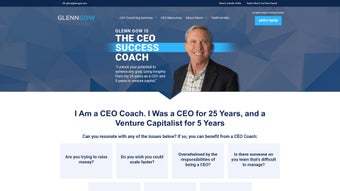
The AI CEO Coach is a web‑based, AI‑driven coaching platform built specifically for chief executive officers who need on‑demand, data‑backed guidance. Conceived by leadership strategist Glenn Gow, the application blends large‑language‑model intelligence with decades of real‑world executive experience. Whether you are steering a freshly funded startup, pivoting an established business, or negotiating a high‑stakes partnership, the AI CEO Coach offers concise, actionable advice that mirrors a one‑on‑one session with a seasoned mentor. Because the tool operates entirely in the cloud, users can access it from any device with an internet connection, making it an ideal companion for busy CEOs who travel frequently or manage distributed teams. While still in beta, the platform already supports a growing library of scenario‑based prompts, from “How to manage rapid growth without burning out the team” to “Negotiation tactics for a multi‑billion‑dollar acquisition.” The AI continually learns from user interactions, ensuring that each response becomes sharper, more context‑aware, and aligned with best practices in modern leadership. In short, AI CEO Coach promises to reduce decision‑fatigue, accelerate strategic thinking, and empower CEOs to lead with confidence, all while maintaining the security and privacy standards required for high‑profile business executives. The service is also designed with scalability in mind, so whether your organization has ten employees or ten‑thousand, the underlying architecture can handle concurrent sessions without latency, guaranteeing that the insight you receive is both timely and reliable. This combination of speed, personalization, and enterprise‑grade security positions AI CEO Coach as a unique, indispensable tool in the modern executive’s toolkit.
Core Features & How They Work
- Personalized Leadership Insights: Users type a specific challenge (e.g., “How to improve employee engagement during a merger”) and receive a tailored response that reflects Glenn Gow’s proven frameworks combined with AI pattern recognition.
- Startup Pivot Engine: A dedicated module that evaluates market signals, product‑market fit metrics, and competitive landscapes to suggest concrete pivot strategies.
- Negotiation Playbook: Real‑time tactics for price negotiations, partnership agreements, and conflict resolution, complete with sample scripts and risk assessments.
- Scenario Simulations: Interactive “what‑if” simulations that let CEOs explore outcomes of strategic decisions before committing resources.
- Progress Tracker & Action Planner: After each coaching session, the tool logs key takeaways and automatically builds a prioritized action list with deadlines.
- Secure Cloud Architecture: End‑to‑end encryption, GDPR compliance, and role‑based access controls protect confidential business data.
- Continuous Learning Loop: Feedback mechanisms let users rate the usefulness of each answer, feeding directly into the AI’s improvement cycle.
Each feature is designed to be both intuitive and deep enough for senior leaders. For example, the Scenario Simulations harness Monte Carlo methods to forecast financial implications of a strategic shift, presenting results in clear visual dashboards. The Progress Tracker integrates with popular project‑management tools such as Asana and Trello, allowing CEOs to sync AI‑generated action items directly into existing workflows. The platform’s AI engine also references a proprietary knowledge base compiled from Glenn Gow’s public talks, books, and case studies, ensuring that advice is not only technically sound but also grounded in real‑world leadership philosophy. Additionally, the Negotiation Playbook draws on a curated repository of over 1,200 successful deal structures, enabling the AI to suggest clause‑by‑clause improvements that align with the user’s risk tolerance. The Startup Pivot Engine continuously scrapes market data from reputable sources such as Crunchbase and PitchBook, translating raw numbers into strategic recommendations that a human advisor would need hours to produce. By delivering these capabilities through a clean, web‑first interface, AI CEO Coach eliminates the need for multiple disparate apps, consolidating executive coaching into a single, secure hub that scales with the organization’s growth.
Installation, Usage & Compatibility
Getting Started – A Step‑by‑Step Guide
1. Visit the official website: Navigate to aiceocoach.com and click the “Start Free Beta” button.
2. Create an account: Provide your corporate email, set a strong password, and verify the account via a secure link sent to your inbox.
3. Complete the onboarding questionnaire: Answer a brief series of questions about your industry, company size, and current strategic priorities. This data helps the AI tailor its responses from day one.
4. Choose your preferred interface: The platform works in any modern browser (Chrome, Edge, Safari, Firefox). For mobile access, download the companion app from the Apple App Store or Google Play.
5. Start coaching: Type a question into the chat‑style console, hit “Enter,” and receive a response within seconds. You can also select from pre‑built templates such as “Quarterly Goal Review” or “Crisis Management.”
6. Review and act: After each session, the built‑in action planner creates tasks that can be exported to your favorite productivity suite. Regularly revisit completed tasks to gauge progress and refine future prompts.
System Requirements & Operating System Support
Because AI CEO Coach is cloud‑native, it does not require local installation on a specific OS. It is fully compatible with:
- Windows 10/11 (any recent version of Chrome, Edge, or Firefox)
- macOS 12 Monterey and later (Safari, Chrome, or Firefox)
- iOS 14+ (dedicated iPhone/iPad app)
- Android 9+ (Google Play version)
- Linux distributions with a supported browser (Chrome/Firefox)
Best Practices for Ongoing Use
To maximize value, CEOs should treat each interaction as a micro‑coaching session. Begin with a clear, concise prompt and, when possible, attach relevant metrics (e.g., “Our churn rate has risen to 8% over the last quarter”). Follow the AI’s recommendations with the built‑in action planner, and schedule a weekly review of completed tasks. Over time, the AI learns your decision style, making future advice even more precise. For teams that share the same account, enable role‑based permissions so that senior executives can view the full history while managers see only the actions relevant to their domain. Another effective habit is to use the “Scenario Simulation” feature after major strategic milestones—this allows you to stress‑test assumptions before committing capital. Finally, regularly provide feedback through the “thumbs‑up/down” rating system; this not only improves the AI for you but also contributes to a community‑wide knowledge base that benefits all beta participants.
Pros, Cons & Frequently Asked Questions
Pros
- Instant, AI‑driven coaching available 24/7.
- Deeply personalized advice rooted in Glenn Gow’s leadership methodology.
- Comprehensive feature set that covers pivots, negotiations, and strategic simulations.
- Secure, GDPR‑compliant cloud infrastructure.
- Cross‑platform compatibility – works on Windows, macOS, iOS, Android, and Linux.
- Free beta access with no hidden fees.
- Integrations with Asana, Trello, and Slack streamline workflow adoption.
Cons
- Still in beta – occasional UI glitches may occur.
- Limited offline functionality (requires internet connection for full features).
- Advanced analytics dashboards are reserved for premium tier (planned for future release).
- Learning curve for executives unfamiliar with AI‑driven interfaces.
FAQ – Your Questions Answered
Is AI CEO Coach suitable for first‑time CEOs?
Absolutely. The onboarding questionnaire adapts the AI’s tone and depth based on experience level, ensuring that new CEOs receive foundational guidance while seasoned leaders get advanced strategic insights.
How does the platform protect confidential business information?
All communications are encrypted with TLS 1.3, data at rest is stored using AES‑256 encryption, and the service complies with GDPR and SOC 2 Type II. Users can also enable two‑factor authentication for added security.
Can the AI replace a human executive coach?
The AI is designed to supplement, not replace, human coaching. It provides rapid, data‑driven suggestions, while a human coach can add nuanced emotional intelligence and long‑term mentorship.
What happens after the beta period ends?
Current beta users will be offered a discounted subscription plan. Existing data and action items will migrate seamlessly, and all core features will remain accessible.
Is there a mobile app, and does it sync with the web version?
Yes. The iOS and Android apps sync in real time with the web platform, ensuring that coaching sessions, action plans, and progress trackers are always up‑to‑date across devices.
Can multiple executives share a single account?
Yes. Role‑based permissions let you assign view‑only, editor, or admin rights to team members, so senior leadership can see all insights while department heads only see the tasks relevant to their area.
Conclusion & Call to Action
In a world where executive decisions are made in seconds and market conditions shift overnight, having a trusted, on‑demand advisor can be the difference between thriving and merely surviving. AI CEO Coach delivers that edge by marrying Glenn Gow’s hard‑won leadership expertise with cutting‑edge artificial intelligence. The platform’s robust feature set, secure cloud architecture, and seamless cross‑device compatibility make it an indispensable tool for any CEO who wants to cut through noise, act decisively, and lead with confidence. While the beta phase means you might encounter minor hiccups, the rapid feedback loop ensures continuous improvement—meaning you’re not just using a product; you’re shaping its evolution.
Ready to experience a new level of strategic clarity? Start your free beta today, and let AI CEO Coach become your silent partner in every boardroom, negotiation, and growth sprint. Elevate your leadership, accelerate your results, and join a community of forward‑thinking CEOs who refuse to settle for generic advice.
Guides & Tutorials for AI CEO Coach by Glenn Gow
How to install AI CEO Coach by Glenn Gow
- Click the Preview / Download button above.
- Once redirected, accept the terms and click Install.
- Wait for the AI CEO Coach by Glenn Gow download to finish on your device.
How to use AI CEO Coach by Glenn Gow
This software is primarily used for its core features described above. Open the app after installation to explore its capabilities.
User Reviews for AI CEO Coach by Glenn Gow 0
No reviews found




